Vibe coding has changed how quickly developers, founders, agencies, and small teams can turn an idea into a working application.
With AI coding tools, you can describe what you want and quickly generate a landing page, WordPress plugin, Laravel application, internal dashboard, API, automation tool, or even an early-stage SaaS product.
But there is a common problem.
AI can generate the application quickly, but it can also generate an unnecessarily expensive infrastructure stack.
Ask an AI coding assistant to build a simple application and you may suddenly find Docker, PostgreSQL, Redis, Supabase, Firebase, Vercel, serverless functions, object storage, queues, and several third-party services in the architecture.
Those technologies aren’t inherently bad. In many projects, they’re exactly what you need.
But if you already have cPanel hosting, reseller hosting, cloud hosting, or a cPanel VPS, you may already be paying for most of the infrastructure required to launch your application.
The smarter approach is simple:
Don’t change your infrastructure to match AI-generated code. Tell AI to generate code that matches your existing infrastructure.
That is where vibe coding on cPanel becomes particularly useful.
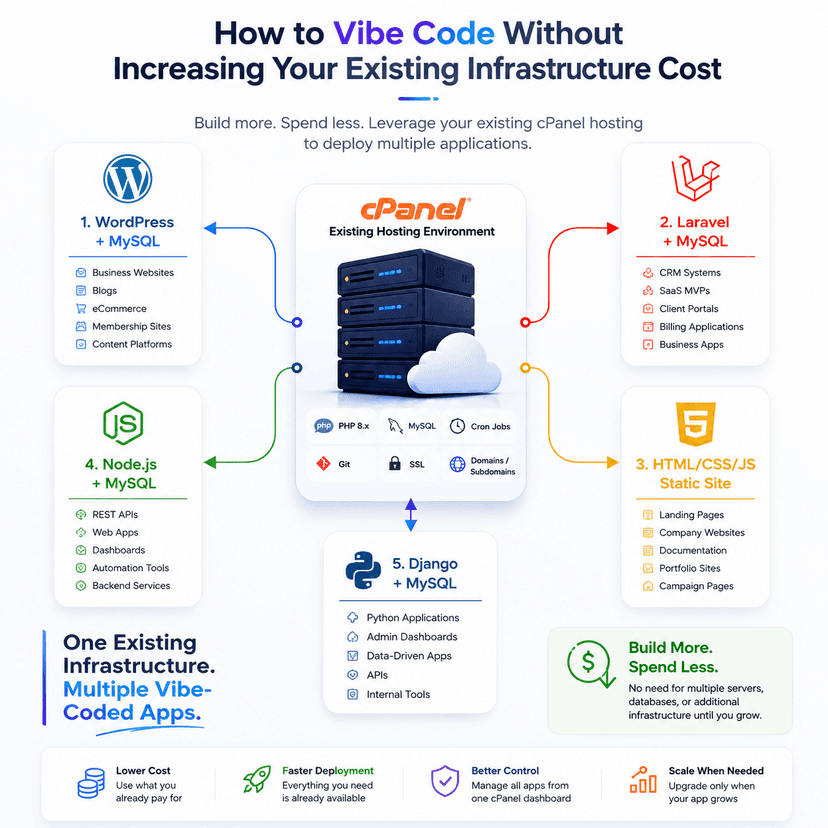
Vibe coding on cPanel means using AI-assisted development while intentionally building applications around the technologies already available in your hosting environment.

Instead of:
Idea → AI Code → New Infrastructure → Deployment → Higher Monthly Cost
Think:
Idea → AI Code → Existing cPanel → Deploy → Go Live
A typical cPanel environment may already provide:
- PHP
- MySQL or MariaDB
- Apache or LiteSpeed
- WordPress
- Composer
- Cron Jobs
- SSL
- Email
- DNS management
- File Manager
- Git tools
- Backups
- Subdomains
- Node.js on supported plans
- Python on supported plans
That’s already enough infrastructure for a surprisingly large number of applications.
The important part is choosing the right stack.
One of the most important decisions should happen before you ask AI to start writing code.
Tell your AI coding assistant exactly where the application will be deployed.
Instead of saying:
Build a customer management application.
Give it infrastructure constraints such as:
Build a customer management application designed for standard cPanel hosting. Use PHP 8.x, Laravel and MySQL/MariaDB. Composer is available. Do not use Docker, Kubernetes, PostgreSQL, Redis, Supabase or Firebase unless absolutely necessary. Scheduled jobs must work through cPanel Cron Jobs. The application should be deployable through a normal cPanel account.
This single instruction can dramatically change the architecture AI generates.
The objective isn’t to avoid modern technology.
It’s to avoid adding infrastructure without a technical reason.
Before starting a vibe-coded project, check what your hosting account already supports.

| Requirement |
Use Existing cPanel Capability |
| Database |
MySQL / MariaDB |
| PHP application |
PHP 8.x |
| Framework |
Laravel |
| CMS |
WordPress |
| Scheduled tasks |
Cron Jobs |
| Static frontend |
HTML / CSS / JavaScript |
| SSL |
AutoSSL / Let’s Encrypt |
| File storage |
Hosting disk space |
| Node.js |
Node.js Selector/Application Manager if available |
| Python |
Python Application if available |
| Database management |
phpMyAdmin |
| Domains |
Domains/Subdomains |
| Email |
Existing hosting email |
Build around these resources first.
Scale beyond them when the application actually requires it.
WordPress is probably the easiest way to start vibe coding on existing cPanel infrastructure.
If WordPress is already supported by your hosting account, you already have the foundation required for many web projects.
A simple architecture looks like:
Domain → cPanel → WordPress → Theme/Plugin → MySQL

You don’t always need to generate an entire application from scratch.
AI can instead generate the functionality that sits on top of WordPress.
WordPress works particularly well for:
- Business websites
- Landing pages
- Blogs
- News portals
- Directories
- Membership websites
- Booking websites
- WooCommerce stores
- Customer portals
- Knowledge bases
- Content-heavy applications
AI coding assistants can help you create custom themes, plugins, Gutenberg blocks, shortcodes, custom post types, REST API endpoints, WooCommerce customizations, admin dashboards and integrations with third-party systems.
For example, instead of building an entire booking platform with a separate frontend, API, database and authentication service, you might build the first version as a custom WordPress plugin.
The result can be significantly easier to deploy and maintain.
If WordPress and MySQL are already included with your hosting account, there may be no additional infrastructure cost for deploying another lightweight WordPress project, assuming your account has sufficient resources.
That makes WordPress particularly useful for validating ideas before investing in more complex infrastructure.
AI-generated WordPress code should never be uploaded blindly.
Always check:
- Input validation and sanitization
- Output escaping
- Nonce verification
- User capability checks
- SQL query safety
- File upload restrictions
- REST API permissions
Treat AI-generated plugins exactly as you would code written by another developer: review it before production deployment.
If you want to build something more application-oriented, Laravel is one of the strongest choices for cPanel environments.
Laravel can be used for:
- CRM systems
- Internal business tools
- Customer portals
- Billing applications
- SaaS MVPs
- REST APIs
- Admin panels
- Booking systems
- Automation dashboards
- Inventory applications
- Business management software
Because Laravel runs on PHP, it fits naturally into many existing cPanel environments.
A typical architecture can remain very simple:
Domain/Subdomain → Laravel → MySQL/MariaDB

No Kubernetes.
No separate database server.
No container orchestration.
No five-service architecture for an MVP that has 20 users.
Before generating the application, give your AI assistant clear deployment requirements.
For example:
Build this application using Laravel and MySQL. It will be deployed on cPanel using PHP 8.x with Apache or LiteSpeed. Composer is available. Do not require Docker or Kubernetes. Use MySQL/MariaDB instead of PostgreSQL. Scheduled jobs must run through cPanel Cron Jobs. Configuration must work through a standard .env file.
You can go further and specify:
Do not introduce Redis, queues, WebSockets, object storage or external database services unless the feature genuinely requires them.
This prevents architecture creep.
Depending on your hosting package and resource allocation, multiple Laravel applications can also run under different domains or subdomains.
For example:
crm.example.com
portal.example.com
api.example.com
Each application can have its own directory, .env configuration, database and database user.
This provides logical separation while still using the infrastructure you’re already paying for.
Sometimes the cheapest backend is no backend at all.
AI coding tools are extremely good at generating static websites.
If you’re building a:
- Landing page
- Product page
- Portfolio
- Documentation website
- Event website
- Marketing website
- Microsite
- Coming-soon page
you may not need Laravel, Node.js, WordPress or Django.
You may only need:
HTML + CSS + JavaScript
These files can be uploaded directly into public_html or the document root of a subdomain.
That’s it.
There is no database to maintain, no application server to keep running and very little infrastructure overhead.
Static websites are also easy to cache and generally have a smaller security surface than dynamic applications.
AI can generate responsive layouts, navigation, forms, animations, FAQ sections, pricing tables and other frontend components very quickly.
For projects that don’t genuinely require server-side functionality, this should often be your first choice.
Node.js doesn’t automatically mean you need a VPS.
Some cPanel environments provide Node.js support through features such as CloudLinux Node.js Selector or compatible application-management tools.
If your hosting plan supports it, you may be able to deploy:
- Express.js applications
- REST APIs
- Lightweight backend services
- Internal dashboards
- Automation applications
- React/Vue frontends with Node.js APIs
- Webhook processors
- Small SaaS applications
while continuing to use the MySQL database included with your hosting account.
A simple architecture could look like:

Domain → cPanel Node.js Application → Node.js/Express → MySQL
Before vibe coding a Node.js application, tell AI:
This Node.js application will run on cPanel. Do not assume Docker, Kubernetes or root access. Use MySQL/MariaDB. Store configuration through environment variables. Keep memory usage low and ensure the application can run through the Node.js application environment provided by the hosting account.
Most importantly, confirm Node.js support with your hosting provider before choosing this architecture.
Node.js availability, supported versions and resource limits can vary significantly between hosting plans.
This is one of the easiest ways to prevent infrastructure costs from growing.
Many AI-generated application architectures automatically introduce services such as:
- PostgreSQL
- Supabase
- Firebase
- MongoDB
- Managed cloud databases
Again, these services can be excellent.
But ask yourself:
Does this application genuinely need another database platform?
If your hosting account already includes MySQL or MariaDB and your application’s data model works well with a relational database, using the existing database can simplify both deployment and billing.
Instead of:
Application → External Database → Separate Billing → Additional Credentials → Additional Backups
you can often use:
Application → Existing MySQL
For each application, create a separate database and dedicated database user.
For example:
app_crm
app_portal
app_booking
Give each application only the database privileges it requires.
This makes projects easier to isolate and manage.
Python developers don’t necessarily have to move every Django project to a separate VPS.
If your cPanel hosting supports Python applications, Django may also be an option.
A typical architecture could look like:
Browser → cPanel Python Application → Django → MySQL

Django is particularly useful for:
- Internal dashboards
- Business applications
- APIs
- Automation tools
- Admin-heavy applications
- Data-driven portals
Django’s built-in authentication, ORM and admin interface also make it attractive for vibe-coded MVPs.
Use instructions similar to:
Build this project using Django and MySQL. The production environment is a cPanel Python Application using a virtual environment and a WSGI-compatible deployment. Do not require Docker, Kubernetes or PostgreSQL. Static files must be deployable through cPanel. Store credentials in environment variables and provide a complete requirements.txt file.
Again, check whether your hosting provider supports Python applications before choosing Django.
The technology isn’t the only thing that matters. Your workflow matters too.
A practical workflow looks like this:
1. Check your hosting capabilities
Identify available PHP, Python and Node.js versions, MySQL/MariaDB availability, memory limits, disk space, cron support and other restrictions.
2. Choose the simplest compatible stack
Don’t choose technology because AI suggested it. Choose it because it matches the problem and your environment.
3. Tell AI your deployment constraints
Include your PHP/Python/Node version, database, web server and infrastructure limitations directly in the prompt.
4. Build locally
Use your preferred AI coding environment to generate and test the application.
5. Review the generated code
Pay particular attention to authentication, authorization, database queries, file uploads, API endpoints and secrets.
6. Create an isolated deployment
Use separate directories, subdomains, databases and database users where appropriate.
7. Deploy to cPanel
Upload through Git, SFTP, File Manager or another deployment method supported by your hosting environment.
8. Test production behavior
Check permissions, environment variables, scheduled tasks, database connections, SSL and application logs.
9. Monitor resource usage
Only consider moving to larger infrastructure when actual usage demonstrates the need.
The goal isn’t to force every application onto shared hosting forever.
The goal is to avoid upgrading infrastructure before you need to.
Moving to a VPS, cloud server or specialized platform can make sense when your application starts requiring:
- Consistently high CPU or RAM
- Long-running background workers
- Advanced queue infrastructure
- WebSocket-heavy workloads
- Docker-based services
- Custom system packages
- Root access
- Specialized databases
- Large-scale object storage
- Complex CI/CD pipelines
- High traffic or concurrency
- Independent scaling of application components
At that point, moving to a VPS isn’t wasted infrastructure.
It’s infrastructure justified by actual requirements.
That’s an important difference.
Vibe coding is an AI-assisted approach to software development where developers describe requirements in natural language and use AI tools to generate, modify, debug and iterate on code.
It can significantly accelerate development, especially for prototypes, internal tools, websites and MVPs.
However, generated code still requires testing, security review and technical oversight.
You can deploy vibe-coded applications to cPanel as long as the generated application is compatible with the runtimes and resources provided by your hosting plan.
PHP, WordPress and static websites generally have the widest compatibility. Node.js and Python depend on the hosting provider and plan.
Yes. Laravel can run on properly configured cPanel hosting with a compatible PHP version, required PHP extensions, Composer access and suitable document-root configuration.
Yes, on cPanel environments that provide Node.js application support. Availability and supported versions depend on the hosting provider.
Django can run on hosting environments that provide compatible Python application support. Check the Python version, WSGI/application configuration and package restrictions before development.
It depends on your application.
If your application only requires a conventional relational database and MySQL is already included in your hosting, MySQL may be the simpler and more cost-effective option.
If you specifically need features offered by another platform, then using an external service may be justified.
The decision should come from application requirements—not simply from the AI assistant’s default stack.
Not automatically.
AI-generated code should be reviewed and tested before deployment, especially for authentication, authorization, database access, file uploads, API endpoints, payment functionality and other security-sensitive features.
The biggest lesson isn’t that cPanel is the right platform for every application.
It isn’t.
The lesson is that your infrastructure should be driven by requirements—not by whatever stack an AI coding assistant generates by default.
If you’re already paying for cPanel hosting that provides PHP, MySQL, SSL, Cron Jobs, backups and potentially Node.js or Python support, use those capabilities first.
Build your WordPress project on WordPress.
Build your PHP application with Laravel and MySQL.
Deploy your marketing site as static HTML, CSS and JavaScript.
Run Node.js or Django through cPanel when your hosting environment supports them.
And move to a VPS or more advanced cloud infrastructure when your application’s actual resource requirements justify the move.
That’s how vibe coding becomes more than just a faster way to generate code.
It becomes a faster way to ship software without unnecessarily increasing infrastructure costs.
At StableCluster, the idea is simple: use the infrastructure you already have before adding more complexity.
A properly configured cPanel environment can support far more than traditional websites. Depending on the hosting plan, it can provide the foundation for WordPress, Laravel, static applications, Node.js, Python and MySQL-based projects.
Start with the simplest architecture that can reliably run your application.
Measure its actual resource usage.
Optimize when necessary.
And scale when the application—not the AI—tells you it’s time.